Features / Controls
Play the way you like.
Any controller, a modern keyboard and mouse layout, button prompts that match what is in your hands, and settings for comfort: subtitles, camera shake, motion blur, a wider view, brightness and a hidden HUD.
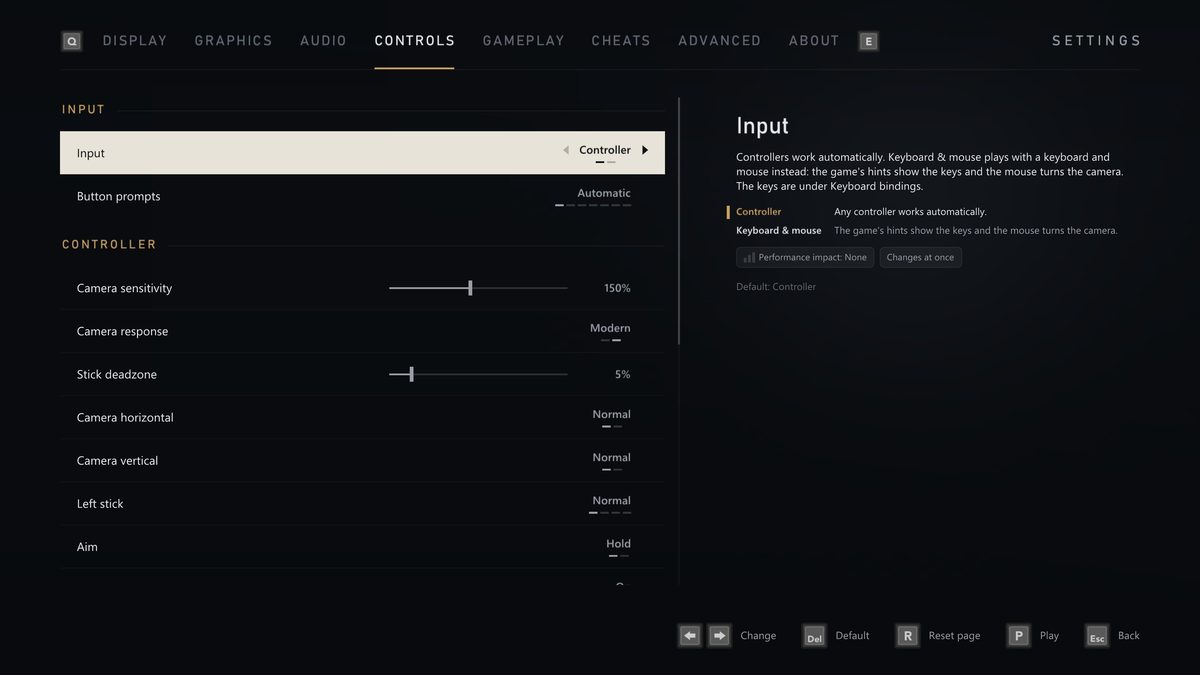
Controllers
Any controller.
- Every controller controls player 1, and so do the keyboard and mouse; rumble reaches every connected controller.
- Remap every button and set the camera sensitivity, the deadzone and the vibration strength from 10% to 200%.
- Camera response: Modern turns the camera the same way in every direction, so circles and diagonals feel even; Original is the Xbox 360's own.
- Aim: Hold, as on the console, or Toggle: press once to raise the gun and again to lower it.
Button prompts
Buttons that match your hands.
Button prompts on Automatic shows the buttons of the controller you hold: Xbox 360, Xbox Series, PlayStation or Steam Deck, in the game and the launcher. Pick any style yourself, the classic PlayStation 2 symbols among them, or Keyboard, which shows the keys you have bound. The first setup asks, with a picture of each style.
Keyboard and mouse
Keyboard and mouse, done right.
Real mouse look: the same movement always turns the camera the same amount, with a sensitivity and an invert setting. A modern layout: the left mouse button shoots, the right one aims, R reloads, W A S D moves and Esc pauses; as Kong, Space jumps and climbs. Every key and mouse button can be rebound, and each binding says what it does for Jack and for Kong.
Comfort
Made comfortable.
- SubtitlesOn or off on the Gameplay tab, and from the pause menu.
- Camera shakeOn or off, with its strength from 10% to 200%.
- Motion blurOff removes the trail the game blends over fast moments.
- Field of viewFrom the original 69° up to 110°.
- Brightness and gammaFor dark rooms and bright ones, also while the game is paused.
- A clean screenHide HUD and F10 hide the HUD, the ammo counter and the subtitles.
- Ten languagesEnglish, German, Spanish, French, Italian, Danish, Dutch, Norwegian, Finnish and Swedish, in the launcher and the game.
- The launcherFully usable with a controller, with sharp text at any Windows display scale.
Handhelds
Handhelds and the Steam Deck.
There is a Steam Deck graphics preset and Steam Deck button prompts. On Linux, the AppImage runs in Steam's Game Mode once you add it to Steam as a non-Steam game; on Windows handhelds, Add to Steam does it in one click. Installing on Linux.