Online co-op / Early access
Play the story with a friend.
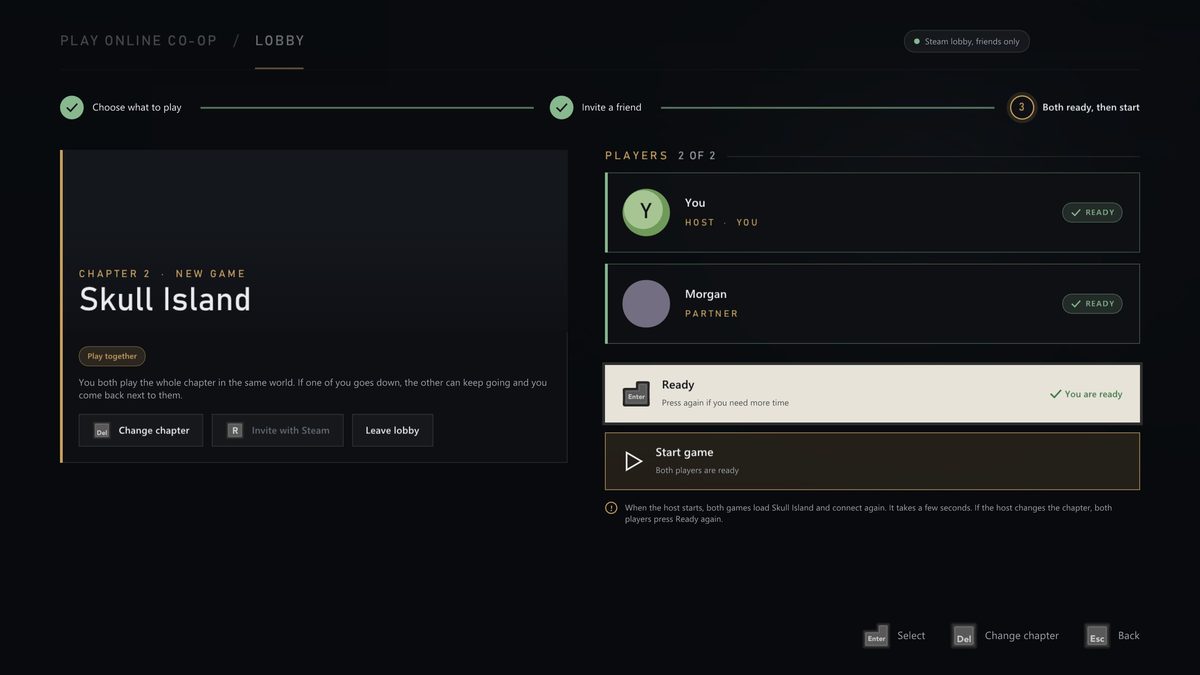
Two players, one story. The host picks a chapter or one of their saves, a friend joins through Steam or with a code, and both games load it together.
Online co-op is in early access. It works, and it is still rough in places: you may run into odd problems, and some chapters may not let you go on. For the smoothest game, play single player. Play co-op to try it early and to help us make it better.
01 How to play
From the launcher, in four steps.
Open Play Online Co-op
It is on the launcher's Home screen, directly under Play.
Host, and choose what to play
Any chapter, or one of your saves. Your partner plays it with you.
Invite a friend
Invite a Steam friend to the lobby, or share your six character code.
Both ready, then start
Both players press Ready, and both games load the chapter together.
02 Joining
Three ways in. All lead to the same lobby.
Accept an invite
Invites from your Steam friends show up in the launcher while the game is open.
Join a friend playing now
Friends who are in King Kong appear in the list. Pick one to join their game.
Type a code
For games hosted by IP address: the host sees their address and code on their lobby screen. No Steam needed.
03 Together
What you share.
One world
The host's game runs the story and the enemies. Your shots count in it, and its enemies can hurt you.
Your partner, in the game
You see your partner in the world, with their name over their head.
Back on your feet
Fall, and you come back next to your partner. Split up, and regroup when you like.
Saves stay yours
The guest's own saves are kept apart from the host's. Chapters you play unlock for you.
04 You need
Before you start.
- Both players need the same version of King Kong, each with their own copy of the game.
- For invites and the friends list, Steam has to be open. Joining with a code works without it.
- If joining fails, the launcher tells you why and what to try.
05 Known issues
What to expect in early access.
- Not every chapter has a player model for the guest yet.
- The guest's game sometimes reloads to catch up with the host.
- People and mission state can drift out of step between the two games.
- Now and then a player is moved out of the map.
Something went wrong? Tell us on the Discord. The launcher's co-op pages have an Open logs folder button, and the logs help us find it.
Free · Bring your own disc
Join the expedition.
Download the port, see how it runs for other players on Quiver, or come and talk to the people making it.